Building an Agent with Guardrails
AI agents are useful because they can call tools and act on user requests. That same flexibility makes them easy to steer off topic. In this workshop, we build a Data Engineering Zoomcamp FAQ agent and add guardrails around it.
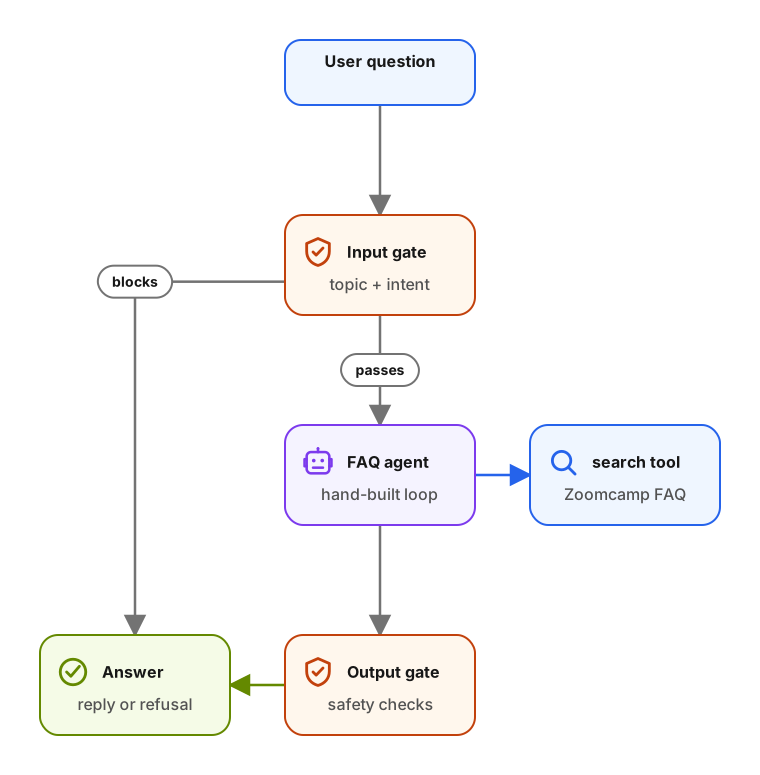
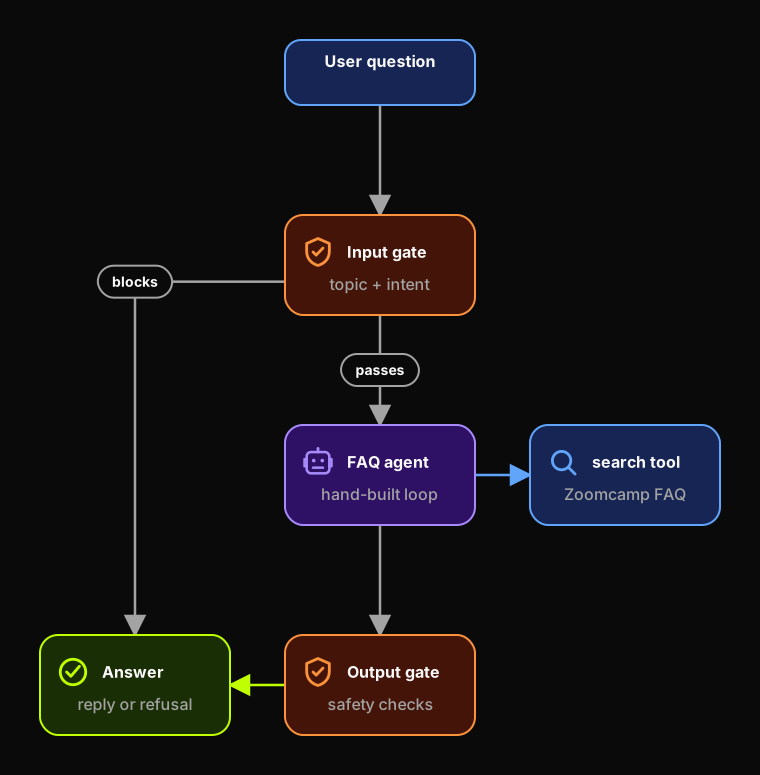
We start with the context for the FAQ bot. We cover what data it
uses, what questions it should answer, and what a normal RAG pipeline
can't do. From there, we turn the RAG pipeline into an agent with one
search tool and add guardrails one at a time.
Workshop flow
We write the examples in Python with Pydantic, minsearch, and the
plain OpenAI Python SDK.
We build the workshop in this order:
- The Data Engineering Zoomcamp FAQ JSON data.
- A RAG baseline with keyword search.
- A framework-neutral agent loop with one
searchtool. - Input checks for topic and intent.
- An async runner that can cancel the FAQ agent.
- Output checks for unsafe promises or policy violations.
- Multiple guardrails with clear responsibilities.
- Concurrent guardrail checks that keep latency low.
We implement the agent loop ourselves so the guardrail approach isn't tied to a specific agent framework.
The guardrail ideas are inspired by the OpenAI Agents SDK guardrails. We implement them directly because not every framework has the same built-in support. If your agent framework doesn't provide input and output guardrails, you can still use the approach from this workshop.
Prerequisites
Before the workshop, make sure you have:
- Python 3.10 or newer.
uvfor the Python environment.- Jupyter Notebook.
- An OpenAI API key, or another model provider you can call from Python.
Links
Resources mentioned in the live training:
- The Agentic Loop from Scratch - the loop this agent runs, built by hand.
- OpenAI function calling guide
- Data Engineering Zoomcamp repository
- Data Engineering Zoomcamp FAQ JSON
Sign in to access this workshop
Tutorial pages
Related content
The Agentic Loop: Building a Mini Agent Framework from Scratch
We start with a fixed RAG pipeline that searches a course FAQ once and passes the results to the model. That works until the search misses. A typo, a question phrased the wrong wa…
July 7, 2026
Building Safe AI Agents with Guardrails
We start with a DataTalks.Club Data Engineering Zoomcamp FAQ assistant. Then we add checks that keep the agent on topic and block unsafe responses. We also show how to cancel wast…
January 6, 2026
Build a Production-Ready YouTube AI Agent with Temporal
We build a deep research agent over the DataTalks.Club podcast archive. We start by downloading and indexing YouTube transcripts. Then we turn that ingestion code into a durable T…
December 16, 2025