Build a Documentation RAG Agent with Search Tools
We build a RAG system over real documentation and turn it into an agentic search flow. For the knowledge base we use the Evidently AI documentation, a real set of Markdown files that keeps changing as the library evolves. RAG helps most here, because LLMs don't know about recent changes in library docs on their own.
What we cover:
- Build a classic RAG pipeline: index documents with minsearch and retrieve highlighted snippets
- Implement
search(returns snippets) andget_file(returns the full document) - Let the LLM pick which tool to call
- Add the tools to an agent using
toyaikitand PydanticAI - The agent reads docs the way people do: search, scan snippets, open the most promising one
We originally delivered this workshop at DataMakersFest 2026 in Porto, Portugal. There's no recording available.
The system you will build
The architecture has one LLM agent with two tools and two data sources:
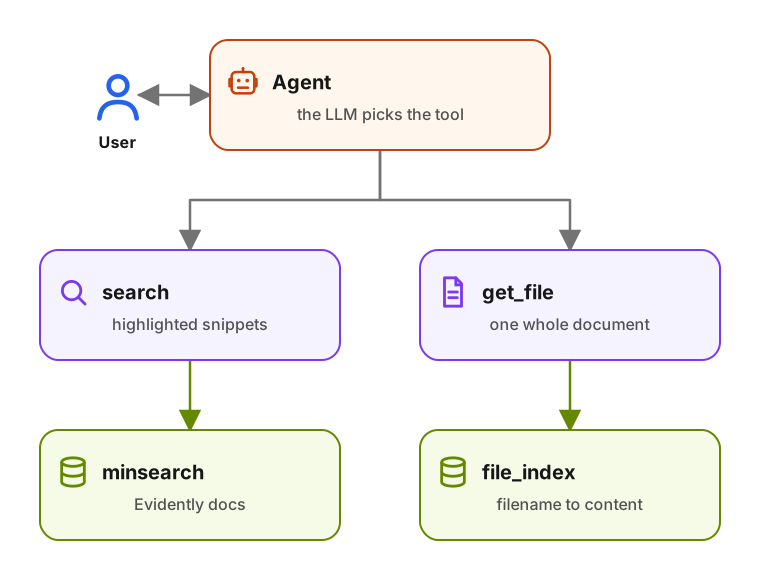
The agent has two tools. search returns short highlighted snippets so the agent can pick which document to open. get_file returns the full document so the agent can read it.
Links
Resources not included in the workshop materials list:
- The Agentic Loop from Scratch - the same loop built by hand, with no framework.
- toyaikit - teaching framework for agents
- PydanticAI - production agent framework
Sign in to access this workshop
Tutorial pages
Related content
Build a Course FAQ Agent with MCP, PydanticAI and OpenAI
We build a course FAQ assistant from the bottom up. First we expose a plain Python search(query) function to the OpenAI Responses API. Then we turn the same idea into a reusable a…
September 1, 2025
Build Your Own Search Engine
We build a search engine from scratch over DataTalks.Club Zoomcamp FAQ documents. We start with TF-IDF text search, then add cosine similarity and field boosting. From there we mo…
May 14, 2026
Build a Coding Agent with Tools, Skills and PydanticAI
We build a coding agent from scratch, starting with tool calls and an agentic loop. We add a skills system that loads reusable instruction files on demand, and the final version r…
April 21, 2026