Build a Course FAQ Agent with MCP, PydanticAI and OpenAI
We build a course FAQ assistant from the bottom up. First we expose a
plain Python search(query) function to the OpenAI Responses API. Then
we turn the same idea into a reusable agent loop and compare toyaikit,
OpenAI Agents SDK, and PydanticAI. Finally we move the FAQ tools behind
an MCP server. From there a notebook, PydanticAI, Cursor, and VS Code can
all reach them.
Links
The main resources:
- AI Bootcamp: From RAG to Agents
- Prerequisite workshop: Building a Coding Agent
- Data Engineering Zoomcamp FAQ source document
- Parsed FAQ JSON
- FAQ parsing notebook
The system you will build
The final setup looks like this:
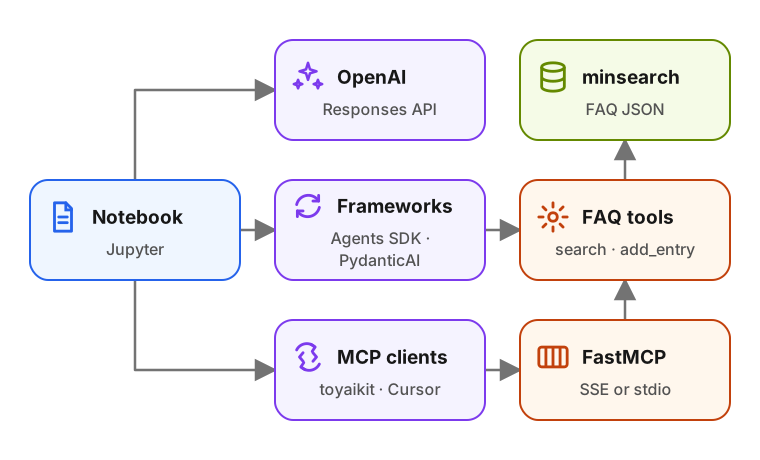
The FAQ data comes from the Data Engineering Zoomcamp FAQ. The first
half of the workshop keeps the tools inside the notebook so you can see
the agent loop directly. The second half moves the same tools into
mcp_faq/, which makes them reusable by any MCP client.
Sign in to access this workshop
Tutorial pages
- Overview and setup
- Part 1: Load the FAQ documents
- Part 2: Start with a plain model call
- Part 3: Make the instructions stronger
- Part 4: Replace the loop with ToyAIKit
- Part 5: Infer tool schemas from Python functions
- Part 6: Install the framework
- Part 7: Create the same agent with PydanticAI
- Part 8: Move the FAQ tools into a project
- Part 9: Connect from Python over stdio
- Part 10: Use the FAQ server from Cursor
- Q&A
- Appendix: file list
Watch the recording
Recording available with Free with sign-in.
Free with sign-in View code on GitHubRelated content
Build a Documentation RAG Agent with Search Tools
We build a RAG system over real documentation and evolve it into an agentic search flow. For the knowledge base we use the Evidently AI documentation, a real set of Markdown files…
May 4, 2026
Build a Coding Agent with Tools, Skills and PydanticAI
We build a coding agent from scratch, starting with tool calls and an agentic loop. We add a skills system that loads reusable instruction files on demand, and the final version r…
April 21, 2026
Skills.md from Scratch: Build a Skill-Driven Coding Agent
A newer, combined version of this workshop is available: Coding Agent with Skills. We start from the coding agent in the prerequisite workshop. We turn it into a general-purpose c…
January 16, 2026