Building a Coding Agent: Python/Django Edition
For a newer, combined take, see Coding Agent with Skills.
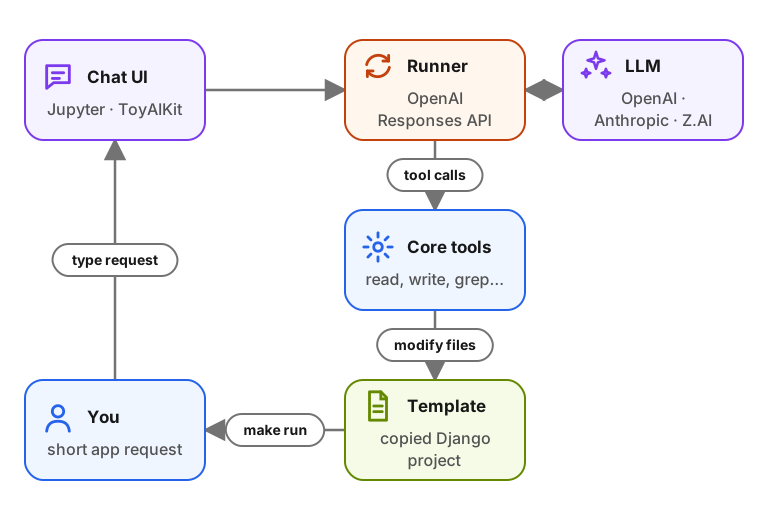
We build a small project bootstrapper for Django, a coding agent that takes a
plain-language app request and copies a working Django template. From there it
reads and writes files through tools, iterating until the generated app runs.
The first version uses the OpenAI Responses API through ToyAIKit. Then we try
the same idea with OpenAI Agents SDK, PydanticAI, Anthropic, and Z.AI.
Links
The main resources:
- ToyAIKit
- Django template repo
- Todo app made with Z.AI
- Related course: AI Bootcamp: From RAG to Agents
- Related workshop: Hands-on with AI Agents and MCP
The app you will build
You chat with the coding agent in a notebook. It's backed by an LLM and a
small set of filesystem tools. You give it a request like to-do list, and
the agent edits a copied Django template and leaves you with a project you
can run.
Two screenshots show what the finished workshop output looks like. The first one shows the notebook chat after the agent plans and starts calling file tools:

The second one shows one of the generated Django todo apps:

Result
The simplest version is intentionally small. It runs in Jupyter, uses local filesystem tools, and edits one copied Django project folder. That's enough to understand how larger coding agents work under the hood.
The same four steps scale to any size of agent:
- Prepare a template.
- Expose the right tools.
- Give the model precise instructions.
- Iterate on the generated code.
Sign in to access this workshop
Tutorial pages
Watch the recording
Recording available with Free with sign-in.
Free with sign-in View code on GitHubRelated content
The Agentic Loop: Building a Mini Agent Framework from Scratch
We start with a fixed RAG pipeline that searches a course FAQ once and passes the results to the model. That works until the search misses. A typo, a question phrased the wrong wa…
July 7, 2026
Building an Agent with Guardrails
AI agents are useful because they can call tools and act on user requests. That same flexibility makes them easy to steer off topic. In this workshop, we build a Data Engineering …
May 26, 2026
Build a Documentation RAG Agent with Search Tools
We build a RAG system over real documentation and evolve it into an agentic search flow. For the knowledge base we use the Evidently AI documentation, a real set of Markdown files…
May 4, 2026