Skills.md from Scratch: Build a Skill-Driven Coding Agent
A newer, combined version of this workshop is available: Coding Agent with Skills.
We start from the coding agent in the prerequisite workshop. We turn it into a general-purpose coding agent with two reusable behavior layers: skills and slash commands. The agent loads a skill when your request matches its description. You invoke a command with a leading slash, and the system renders it into a prompt before the agent acts.
Links
External resources for this workshop:
- Starting notebook
- GitHub fetch skill
- Prototype implementation
- Prerequisite coding-agent workshop
- ToyAIKit
- OpenCode
- OpenCode skills documentation
- AgentSkills spec
The agent you will build
By the end you'll have built a system that looks like this:
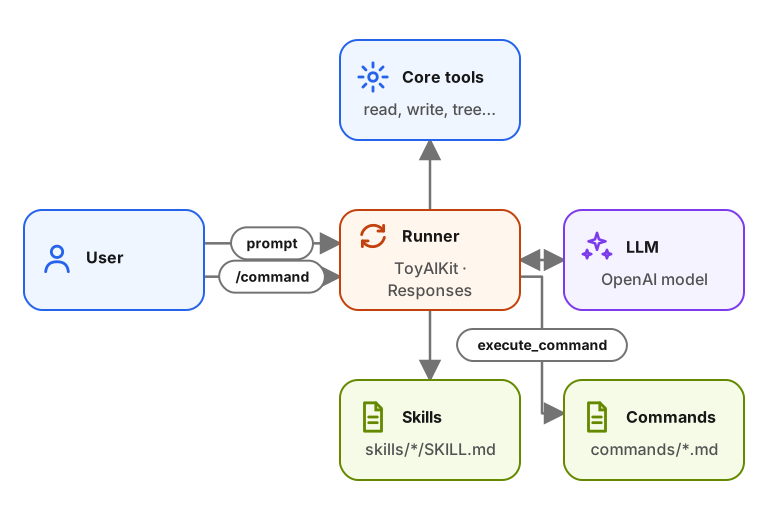
The project stays small enough to understand in a notebook, but it mirrors
the pieces used by real coding agents. The coding tools let the model read,
write, search, and run commands. The skill loader turns SKILL.md files with
YAML frontmatter into tool-loadable instructions. The command loader turns
markdown files like review.md or test.md into reusable prompt templates.
Sign in to access this workshop
Tutorial pages
- Overview and setup
- Part 1: Demoing skills and commands
- Part 2: Recapping the coding agent
- Part 3: Building the base runner
- Part 4: Defining the skill format
- Part 5: Loading `SKILL.md`
- Part 6: The skill tool and prompt injection
- Part 7: Implementing commands
- Part 8: The fuller prototype
- Q&A: skills and commands
- Deferred items
- Appendix: workshop files
Watch the recording
Recording available with Free with sign-in.
Free with sign-in View code on GitHubRelated content
Build a Coding Agent with Tools, Skills and PydanticAI
We build a coding agent from scratch, starting with tool calls and an agentic loop. We add a skills system that loads reusable instruction files on demand, and the final version r…
April 21, 2026
Build a Course FAQ Agent with MCP, PydanticAI and OpenAI
We build a course FAQ assistant from the bottom up. First we expose a plain Python search(query) function to the OpenAI Responses API. Then we turn the same idea into a reusable a…
September 1, 2025
Build a Documentation RAG Agent with Search Tools
We build a RAG system over real documentation and evolve it into an agentic search flow. For the knowledge base we use the Evidently AI documentation, a real set of Markdown files…
May 4, 2026