Deploying an Agent to AWS Lambda
Recording available with Main or above.
We start from the FastAPI service we deployed to Railway in the previous workshop. We strip out FastAPI and swap it for a custom AWS Lambda runtime. The runtime handles both the static frontend and the streaming agent API. We deploy one container image as a Lambda Function URL with SSE streaming.
A coding agent (Codex) does most of the code-writing, and the exact prompts I used are quoted verbatim.
This was a freestyle session, so we also talk a lot about the process. We cover how to work with agents, when to trust them, and when to slow down and read the code.
Links
These materials are related:
Changes from the previous workshop
Here's where Lambda fits in the request path:
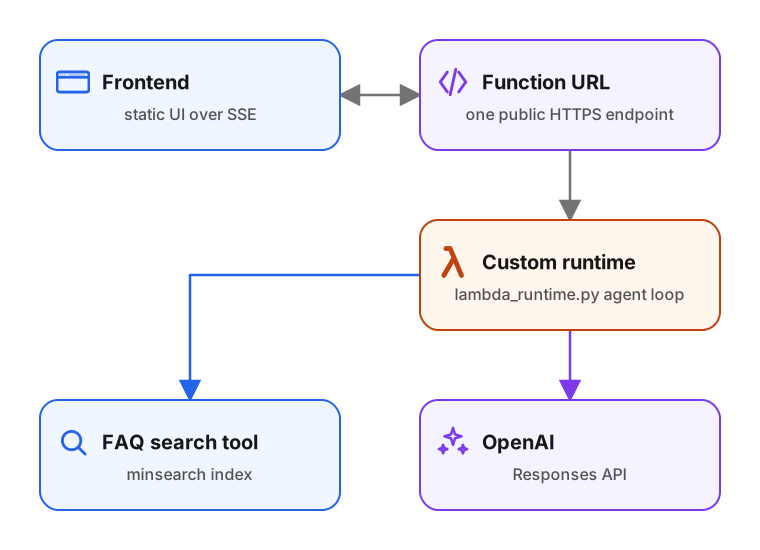
The agent loop, the search tool, the renderer abstraction, and the frontend are unchanged from the previous workshop.
We change the web layer and the deployment pipeline:
- FastAPI is gone. A custom Lambda runtime (
backend/lambda_runtime.py) handles routing, static file serving, and SSE streaming directly against the Lambda Runtime API. - The Dockerfile is rebased on
public.ecr.aws/lambda/python:3.14instead ofpython:3.14-slim. - The
./deploy.shscript handles deployment. It builds a container image and pushes it to ECR. Then it deploys a CloudFormation stack that creates the Lambda function and a Function URL withRESPONSE_STREAMinvoke mode. - Railway and the GitHub Actions promotion workflow are gone.
Moving to Lambda changes what you pay for. With Railway or Render you pay for a server that has to be up all the time. With a Lambda Function URL you only pay per invocation, which fits tools and small agents that run occasionally.
Extra material
Additional pages outside the main flow:
- Appendix: isolating the AWS environment - how to create an isolated AWS sub-account, generate short-lived credentials, and copy them to the machine that runs the agent. This step links to the reproducible scripts in aws-account/.
Upgrade to Basic to access this workshop
- Full workshop overview
- Complete page list
- Step-by-step tutorial
- Cancel anytime
Tutorial pages
- Overview and setup
- Replace FastAPI with Lambda
- The custom Lambda runtime
- Routing, streaming, and static files
- Dockerize on the Lambda Python image
- Local testing with the Runtime Interface Emulator
- deploy.sh and the deploy scripts
- Things that broke during the first deploy
- Local dev without rebuilding the image
- Organize the repo and publish
- Deferred items
- Q&A: side discussions
- Appendix: file inventory
- Appendix: isolating the AWS environment
More from AI Shipping Labs
Jev for LLM Evaluations
In the batch and flex workshop we built an eval for the FAQ agent and scored it with an LLM judge. Here we swap that judge for Jev, a model that returns typed decisions instead of…
September 22, 2026
After the Interview: Offers and Negotiation
What happens after the interviews end: how to handle rejections without losing momentum, when to accept an offer, and how to negotiate salary with confidence.
September 16, 2026
The AI Engineering Field Guide
A data-driven guide to the AI engineer role: what the job involves, how the interview process works, and how to handle offers, based on 6,964 real job descriptions.
September 16, 2026