Building and Maintaining a Slack Moderation Bot for an 88k-Member Community
A story about how I built and maintained a Slack moderation bot for an 88k-member community using AI and AWS Lambda.
DataTalks.Club community has grown to more than 88,000 people and lives across many Slack channels. Moderating a community at this scale is time-consuming.
We also run “shameless-promotion” channels, and as the community grew, I introduced rules and message templates for posting there. I had to manually delete messages that violated the rules and send DMs explaining the reasons to those people. It quickly became impractical because it required a lot of manual steps
That is what pushed me to build an automation tool that could delete messages violating the rules and send a direct message explaining why.
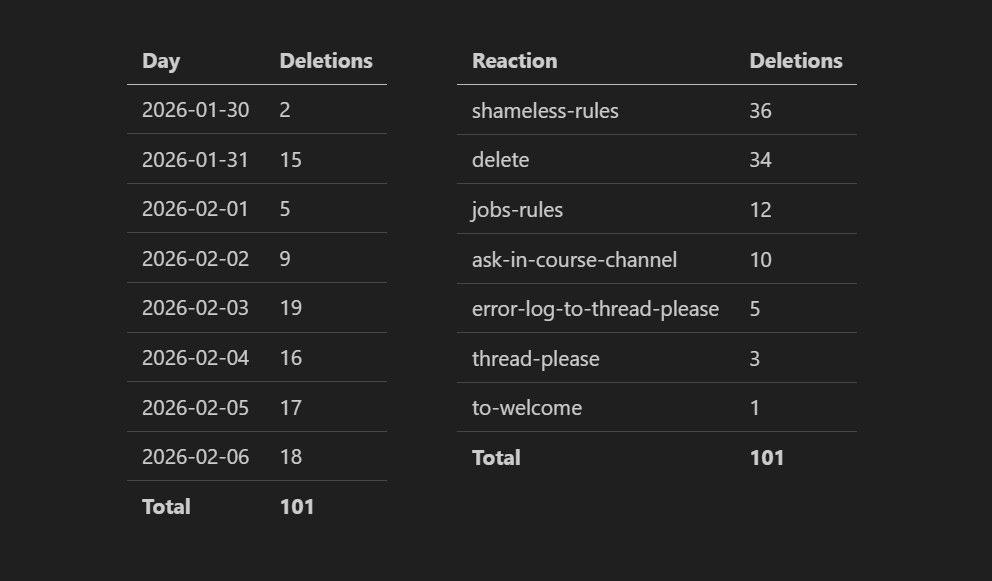
That is why I built the AuTomator bot back in June 2022 and kept adding features as new needs came up. Recently, the bot broke, and I fixed it using Claude Code, which saved me at least two hours of debugging.
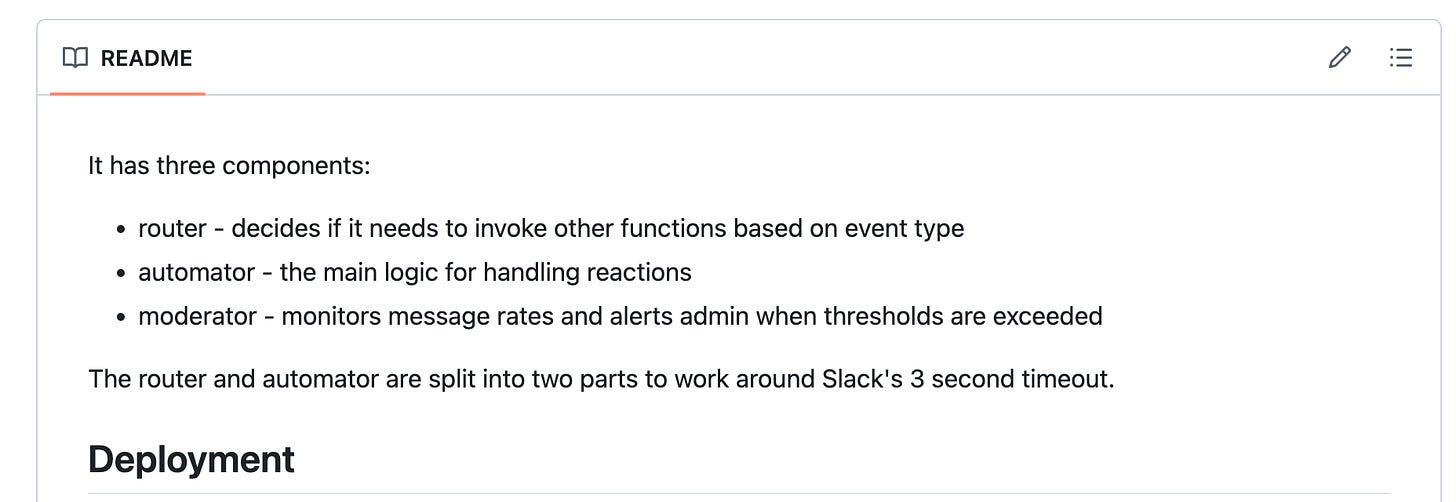
How the AuTomator Works
AuTomator bot is a backend running on AWS Lambda.
It is split into three Lambdas, each with a clear responsibility.
1. Router: Routes Slack events to the automator or moderator
The router checks incoming emoji reactions to see whether they were added by an admin. If so, it forwards the event to the automator.
The router exists for a purely technical reason: Slack enforces a strict time limit on how quickly reaction events must be acknowledged. By keeping the router lightweight and delegating all real work to the automator, the system avoids timeouts and dropped events.
2. Automator: Acts based on the emoji reaction by the admin
The automator is responsible for actually doing something when a reaction emoji is added.
The bot has a predefined list of emojis and the actions they represent. This is configured in a YAML file, and adding a new reaction is fairly straightforward.
When I react to a message with one of these emojis, the automator looks up what that reaction means and runs the corresponding action. This can be deleting a message, reposting it in a thread, or asking an AI to generate a reply. For example, when I add an :ask-ai: reaction, the automator replies in the thread with an AI-generated answer.
In some cases, the automator also contacts the author of the original message. For example, if I add a :shameless-rules: reaction, the automator deletes the message and sends the author a direct message explaining that the post violated the community rules and was removed.
3. Moderator: watches message activity and helps the admin react quickly
The moderator is a new Lambda that I implemented with GitHub Copilot. It is not deployed yet and still needs real-world testing.
Its role is to monitor message activity over time and spot simple patterns, like someone posting too many messages in a short period. When that happens, it sends an alert to an admin and includes action buttons directly in Slack.
These buttons allow the admin to delete recent messages, deactivate the user, or ignore the alert without leaving Slack. I’ll need to review Copilot’s work and check whether the moderator actually works as intended.
Fixing the bot with Claude Code
In addition to my Moderator experiment, Claude helped me fix the AuTomator when it stopped working. One of the messages didn’t get deleted after I added a reaction.
Under normal circumstances, fixing this would have meant spending several hours on:
- Opening CloudWatch
- Searching through logs
- Trying to reconstruct what broke and why
- Manually fixing and redeploying
I didn’t have that time because I was preparing for a family trip. So I handed the task to Claude Code that successfully fixed the issue.
I asked it to fetch the last two hours of logs and figure out what was wrong.
It found 2 problems
- GROQ_API_KEY was missing for ask-ai reactions
- Error when deleting messages that contain curly braces
While I was looking for the new key, it fixed the curly braces issue. Then I gave it the key, and it updated the environment variables for the lambda.
Done. It was fixed while I was packing and getting ready to leave.
All of this happened without opening a browser or clicking through the AWS console.
For me, urgent maintenance, operational tasks, and situations where execution matters more than careful design are where Claude Code fits most. And for slower and more interactive coding, I prefer tools like Cursor, Google Antigravity, or GitHub Copilot.
Related content
How Claude Code Accidentally Wiped Our AWS RDS Database (24-Hour Recovery)
An incident story: how I accidentally wiped our AWS RDS production database and deleted snapshots by letting Claude Code touch production infrastructure.
March 6, 2026
ChatGPT Data Viewer: Search and Visualize Your Entire ChatGPT History Locally
Learn how I built the ChatGPT Data Viewer, a local app that searches and visualizes your ChatGPT export with statistics and a GitHub-style activity view.
February 27, 2026
SQLiteSearch: Lightweight Text and Vector Search Library in Python
Learn how I built SQLiteSearch, a lightweight, single-file Python library for fast text and vector search with SQLite (no Docker).
February 20, 2026