Serving Open Models with vLLM on RunPod
Recording available with Main or above.
Serving an open-source model yourself means renting a GPU and running an inference server on it. In this workshop we take a quantized DeepSeek model and rent a GPU by the hour on RunPod. We serve it with vLLM behind an OpenAI-compatible API. Then we point a small tool-calling FAQ agent at it, the same way we would point it at OpenAI.
An AI assistant (Codex) writes most of the code, and we quote the prompts verbatim.
This was a freestyle session with no prep, so we also hit the problems:
- A model that doesn't fit the card.
- A full container disk.
- An SSH session that keeps dropping.
- A tool parser that needs a flag we didn't set.
Each one has a fix you'll want to keep.
Links
These materials are related:
- Previous workshop: end-to-end agent deployment
- RunPod console
- vLLM documentation
- Modal vLLM inference tutorial
The system you build
The model runs on the rented GPU, not on your laptop. Everything you write locally talks to it over HTTP, exactly the way it talks to OpenAI. Only the base URL and the API key change.
We use these pieces:
- A GPU pod on RunPod runs the model.
- vLLM serves it behind an OpenAI-compatible HTTP API.
- RunPod's HTTPS proxy exposes that API, guarded by a bearer token.
- The FAQ agent runs on your laptop and calls one
searchtool.
The request path looks like this:
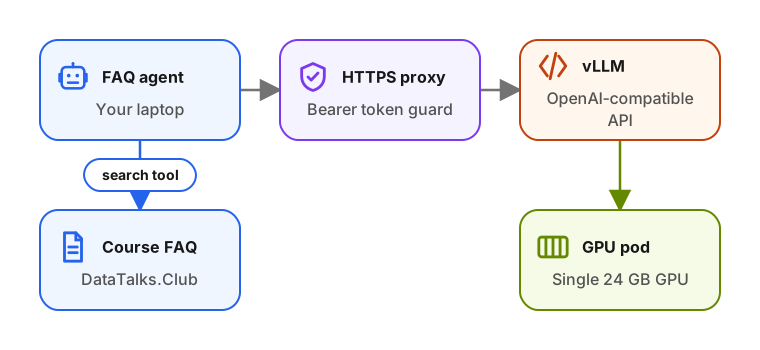
The model is stelterlab/DeepSeek-R1-Distill-Qwen-14B-AWQ, a 14-billion-parameter model quantized to fit a single 24 GB consumer GPU.
We reuse the FAQ search agent from the
end-to-end agent deployment workshop.
We port it from the OpenAI Responses API to vLLM's chat completions API. It
answers Data Engineering Zoomcamp questions with one search tool against the
course FAQ.
Workshop flow
We build the workshop in this order:
- Rent a GPU by the hour on RunPod and connect over SSH.
- Install vLLM and serve a quantized model.
- Fit the model on the card, then move the caches to the pod volume.
- Port the FAQ agent and get the open model to make tool calls.
- Reach the model over the network with an API key.
- Make the whole thing reproducible with a one-command deploy.
- Shut everything down, including the storage that keeps billing after the pod is gone.
In the reproducible deploy, we recreate the part we ran out of time to finish. I learned the teardown step from a mistake: stopping the pod doesn't stop the storage bill.
Upgrade to Basic to access this workshop
- Full workshop overview
- Complete page list
- Step-by-step tutorial
- Cancel anytime
Tutorial pages
More from AI Shipping Labs
Jev for LLM Evaluations
In the batch and flex workshop we built an eval for the FAQ agent and scored it with an LLM judge. Here we swap that judge for Jev, a model that returns typed decisions instead of…
September 22, 2026
After the Interview: Offers and Negotiation
What happens after the interviews end: how to handle rejections without losing momentum, when to accept an offer, and how to negotiate salary with confidence.
September 16, 2026
The AI Engineering Field Guide
A data-driven guide to the AI engineer role: what the job involves, how the interview process works, and how to handle offers, based on 6,964 real job descriptions.
September 16, 2026