Build an Agent Evaluation Framework with OpenAI Batch and Flex
Recording available with Main or above.
We take the FAQ agent from the first deployment workshop and build an evaluation framework around it. We don't change the agent, so all the new work goes into the pipeline around it. The pipeline generates synthetic student questions, runs the agent over them, and then asks an LLM judge to score the answers. We end up with a repeatable eval set that we can rerun after every change to the agent.
Two OpenAI pricing features make the eval cheaper to run. The Batch API processes a whole file of requests at about half the standard price. It returns results within 24 hours, usually within a few minutes.
Flex processing charges the same batch rate but returns results in real time, with a longer and less predictable wait. You can combine both with prompt caching. It applies automatically when requests start with the same text (the prompt prefix).
In this session we explore and don't aim for polished code. We port a working synthetic-data generator from the AI Engineering Buildcamp to this project. Then we try Batch and Flex on the same task and compare what each gives us.
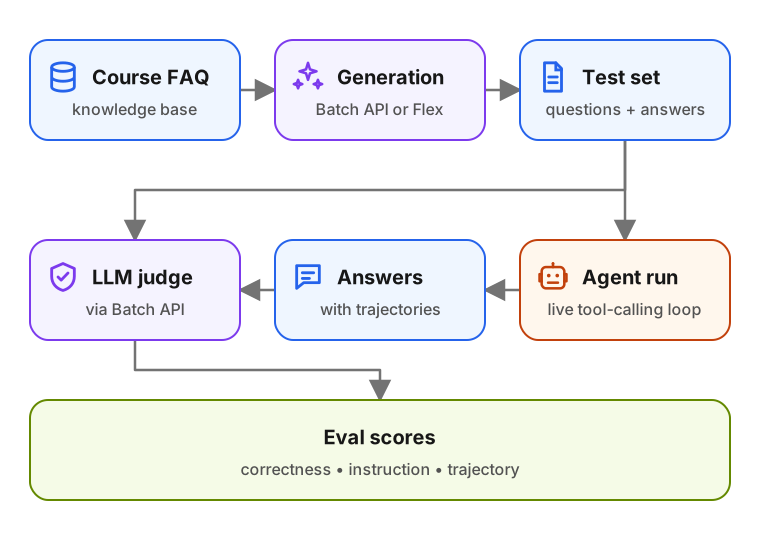
Generation and judging are batches of independent one-shot LLM calls, so both fit the Batch API. Running the agent needs live back-and-forth tool calls, so we keep it on the standard endpoint.
I used Claude Code with Opus for most of the coding. I dictated most prompts, and the agent both wrote and tested the scripts. The code is exploratory, and I point out places to refactor for a cleaner version.
Links
Resources used here:
- End-to-End Agent Deployment - the FAQ agent we evaluate.
- AI Engineering Buildcamp synthetic eval code - the working version we port from.
- OpenAI Batch API guide - the docs for the batch endpoint.
- OpenAI Flex processing guide - the docs for the flex tier.
- OpenAI prompt caching - how prompt caching applies across Batch and Flex.
Upgrade to Basic to access this workshop
- Full workshop overview
- Complete page list
- Step-by-step tutorial
- Cancel anytime
Tutorial pages
More from AI Shipping Labs
Jev for LLM Evaluations
In the batch and flex workshop we built an eval for the FAQ agent and scored it with an LLM judge. Here we swap that judge for Jev, a model that returns typed decisions instead of…
September 22, 2026
After the Interview: Offers and Negotiation
What happens after the interviews end: how to handle rejections without losing momentum, when to accept an offer, and how to negotiate salary with confidence.
September 16, 2026
The AI Engineering Field Guide
A data-driven guide to the AI engineer role: what the job involves, how the interview process works, and how to handle offers, based on 6,964 real job descriptions.
September 16, 2026