Build a Coding Agent with Tools, Skills and PydanticAI
We build a coding agent from scratch, starting with tool calls and an agentic loop. We add a skills system that loads reusable instruction files on demand, and the final version runs on PydanticAI.
The agent can read and write files, run shell commands, and search the codebase. It loads specialized skills too, all inside a structured Django project template.
We combine and update two earlier sessions here: Building a Coding Agent and Skills.md from Scratch.
What we cover:
- Tool calls with the OpenAI Responses API: from no tools to a full agent loop
- Building a coding agent with five core tools (read, write, tree, bash, search)
- Skills: reusable instruction files loaded by the agent on demand
- Porting the same agent to PydanticAI
This workshop was originally delivered at MLCon 2026 Amsterdam. There is no video recording available.
The agent you will build
The architecture of the final agent:
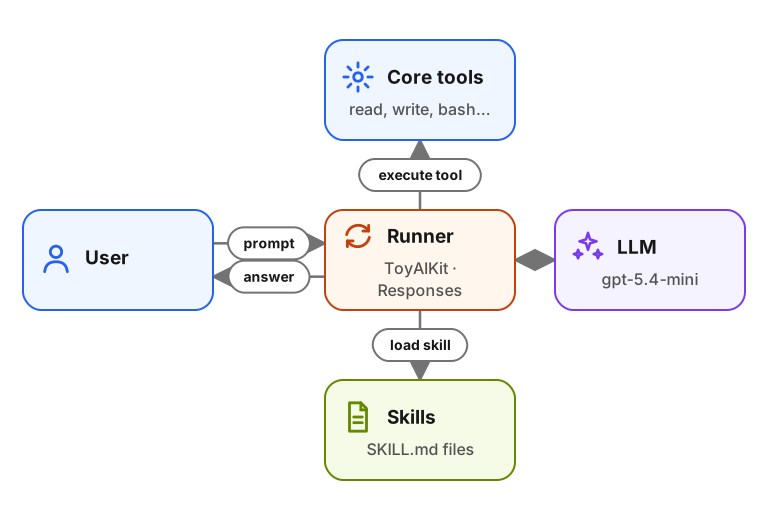
The agent runs inside a Django project template. It has five core tools for
interacting with the filesystem and shell. A skills tool loads extra
instructions from SKILL.md files when the agent finds them relevant.
We build it in four parts:
- Understand tool calls with the OpenAI Responses API.
- Build the coding agent with five core tools.
- Add the skills system.
- Port the same agent to PydanticAI.
Links
These workshops and resources are related:
- Previous coding-agent workshop - the v1 version without skills
- agent-skills workshop - the standalone skills workshop
Sign in to access this workshop
Tutorial pages
Related content
Skills.md from Scratch: Build a Skill-Driven Coding Agent
A newer, combined version of this workshop is available: Coding Agent with Skills. We start from the coding agent in the prerequisite workshop. We turn it into a general-purpose c…
January 16, 2026
Build a Course FAQ Agent with MCP, PydanticAI and OpenAI
We build a course FAQ assistant from the bottom up. First we expose a plain Python search(query) function to the OpenAI Responses API. Then we turn the same idea into a reusable a…
September 1, 2025
Build a Documentation RAG Agent with Search Tools
We build a RAG system over real documentation and turn it into an agentic search flow. For the knowledge base we use the Evidently AI documentation, a real set of Markdown files t…
May 4, 2026